
Odoo CRM Automation: Lead Management & Sales Follow-Ups
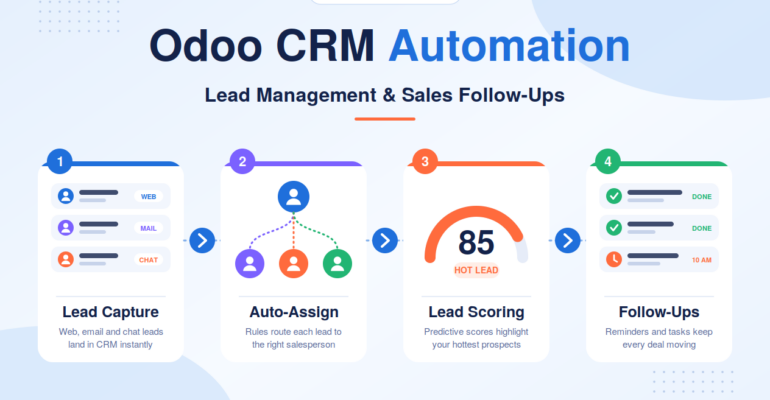
Odoo CRM Automation: Lead Management & Sales Follow-Ups
 Bhargav A
Odoo CRM automation helps businesses manage customer enquiries, organize leads, and streamline sales follow-ups. As a business grows, maintaining a clear process for capturing enquiries, assigning them to the right salespeople, and tracking opportunities becomes essential for converting prospects into customers.
However, managing these activities manually can become increasingly difficult. Enquiries from websites, emails, social media, phone calls, and referrals may get scattered across spreadsheets and inboxes. This can result in missed follow-ups, duplicate records, delayed responses, and limited visibility into sales performance.
With Odoo CRM, businesses can centralize customer information, schedule sales activities, manage opportunities, and configure workflows to reduce repetitive tasks. These capabilities help sales teams maintain consistent communication with prospects and give managers a clearer view of the sales pipeline.
In this guide, we explore the key Odoo CRM automation features for lead management and sales follow-ups, along with practical ways businesses can use them to build a more organized and efficient sales process.
What Is Odoo CRM Automation?
Odoo CRM automation uses built-in features and configured workflows to simplify lead management and sales follow-ups. It helps businesses organize enquiries, assign leads, schedule activities, and track opportunities from a centralized platform.
Depending on the Odoo version and configuration, businesses can also use automated lead assignment, predictive lead scoring, activity reminders, and workflow rules to reduce repetitive tasks.
The goal is simple: spend less time on manual administration and more time building customer relationships.
7 Ways Odoo CRM Automates Lead Management and Sales Follow-Ups
1. Capture Leads From Multiple Sources
Managing enquiries from websites, emails, and other channels manually can lead to missed opportunities and duplicate records.
Odoo CRM can collect leads through supported website forms, incoming email configurations, imports, and integrations with external platforms.
For example, a website enquiry can be recorded in Odoo through a properly configured website-to-CRM workflow, allowing the sales team to review and follow up.
Business benefit: Centralized lead information and less manual data entry.
2. Assign Leads to the Right Salesperson
When multiple salespeople handle enquiries, manual assignment can delay responses and create uneven workloads.
Odoo CRM supports rule-based lead assignment, allowing businesses to configure distribution according to sales team responsibilities and defined criteria.
For example, a company can route enquiries to the appropriate regional sales team based on the configured assignment rules.
Business benefit: Clear lead ownership and more organized distribution.
3. Schedule Follow-Ups and Reminders
Consistent follow-ups help sales teams maintain communication with prospects throughout the buying journey.
Odoo CRM allows users to schedule calls, meetings, emails, and other activities directly on lead and opportunity records. Upcoming and overdue activities help salespeople identify what needs attention.
Activity plans can also help standardize recurring follow-up steps where supported and configured.
Business benefit: Better follow-up management and fewer missed activities.
4. Automate Repetitive Sales Tasks
Sales teams often repeat tasks such as creating follow-up activities, notifying managers, and reviewing inactive opportunities.
With suitable Odoo automation rules, businesses can trigger actions when defined conditions are met. For example, a rule can create a follow-up task when an opportunity reaches a particular stage.
More complex workflows may require additional configuration or custom development.
Business benefit: Reduced administrative work and more consistent sales processes.
5. Prioritize Leads With Predictive Lead Scoring
Not every lead has the same likelihood of becoming a customer. Odoo CRM includes predictive lead scoring in supported versions, using historical CRM data to estimate the probability of winning an opportunity.
Sales teams can use these estimates alongside customer requirements and their own judgment to prioritize promising opportunities.
The usefulness of predictive scoring depends on the quality and availability of historical data.
Business benefit: Better prioritization of sales opportunities.
6. Track Opportunities Through the Sales Pipeline
Odoo CRM provides a visual pipeline that helps businesses track opportunities through stages such as initial contact, qualification, proposal, negotiation, and won or lost.
Salespeople can review opportunity details and planned activities, while managers can identify stalled deals and pending follow-ups.
Pipeline stages can be adapted to match the company’s sales process.
Business benefit: Clearer visibility into sales progress and potential bottlenecks.
7. Connect CRM With Websites and Other Applications
Businesses often use separate systems for website enquiries, email communication, and marketing activities. Connecting these systems with Odoo can reduce manual data transfers and disconnected records.
Depending on the requirements, integrations can transfer website enquiries, connect supported communication workflows, and synchronize selected information from external applications.
Banastech’s Odoo CRM Integration, Odoo Website Integration, and Odoo API Integration services can help businesses explore suitable integration options.
Business benefit: Better coordination between lead generation and sales operations.
Best Practices for Implementing Odoo CRM Automation
Before automating your sales process, consider the following best practices.
Define Your Sales Process First
Document how leads enter the business, how they are qualified, who handles each stage, and what happens next. Automation works best when the underlying process is clear.
Keep Lead Data Accurate
Use consistent fields, validate incoming data where possible, and establish procedures for handling duplicates. Poor-quality data can lead to incorrect assignments and unreliable reports.
Start With High-Value Automations
Begin with a few useful workflows, such as lead assignment, follow-up reminders, or alerts for inactive opportunities. Test them before expanding the automation scope.
Avoid Excessive Notifications
Too many alerts can make users ignore important messages. Notify the right people only when an action is genuinely required.
Review Performance Regularly
Monitor overdue activities, conversion trends, and pipeline quality. Adjust workflows when the sales process changes or the team identifies recurring problems.
Plan for Training and Support
Salespeople need to understand how to update opportunities, complete activities, and record customer interactions. Training and ongoing support help maintain consistent CRM usage.
Why Odoo CRM Customization May Be Necessary
Standard Odoo CRM features can support many common sales processes, but some businesses have specialized requirements.
For example, a real estate company may need to track property preferences and site visits. A consulting firm may need approval steps before a proposal is sent. An international sales organization may require routing based on territory, language, or product expertise.
Depending on the requirements, Odoo CRM customization may include:
- Custom lead fields and opportunity information
- Business-specific sales stages
- Advanced assignment and approval workflows
- Tailored notifications and activity rules
- Custom dashboards and reporting
- Integration with external systems through suitable APIs
The first step should be to evaluate standard Odoo functionality. Custom development is most appropriate when a genuine business requirement cannot be met effectively through configuration alone.
Banas Tech provides Odoo development and customization services for businesses that need tailored functionality and connected workflows.
How Banas Tech Can Help With Odoo CRM Implementation
Implementing sales automation requires an understanding of both business processes and technical requirements.
Banas Tech’s published Odoo service offerings include integration and development capabilities that businesses can explore when planning their CRM workflows.
Depending on your project scope, the implementation process may involve:
- Reviewing existing lead management and follow-up processes
- Configuring CRM stages, activities, and user responsibilities
- Evaluating lead assignment and automation requirements
- Connecting website forms or other supported applications
- Identifying where custom development may be necessary
- Testing workflows and supporting users during rollout
Businesses can also explore Odoo Website Integration services when website enquiries need to connect with Odoo-based workflows.
The right solution depends on the company’s sales process, existing systems, data quality, and desired level of automation.
Conclusion: Make Lead Management More Consistent With Odoo CRM
Managing leads effectively requires more than collecting customer enquiries. Businesses need a clear process for assigning responsibility, scheduling follow-ups, tracking opportunities, and reviewing sales performance.
Odoo CRM can help organize these activities in a centralized system and support automation where appropriate. With well-designed workflows, businesses can reduce repetitive administrative work, improve visibility into pending activities, and build a more consistent approach to sales management.
The most effective implementation begins with the business process itself. By choosing relevant automations, maintaining accurate data, and training the sales team, organizations can create a CRM workflow that supports their current needs and future growth.
Looking to automate lead management and sales follow-ups with Odoo CRM?
Banas Tech can help you explore Odoo CRM implementation, customization, and integration options based on your business requirements.
Contact Banas Tech to discuss your sales workflow and identify opportunities to streamline your CRM processes.